

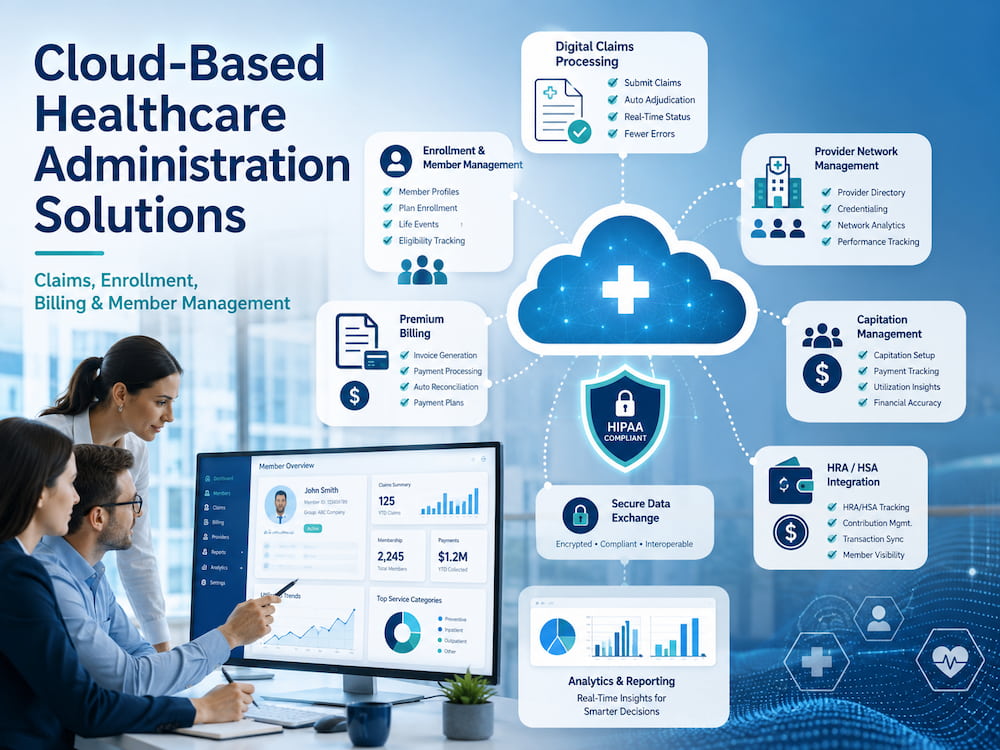
Healthcare administration has become too complex for disconnected spreadsheets, aging on-premise applications, and manual handoffs between departments. Organizations need technology that can manage claims, enrollment, billing, provider relationships, and member data as connected parts of the same operation. MCSI – Visova is one example, offering a cloud-native vpaas designed to support HIPAA-compliant healthcare administration. Its platform supports automated claims processing, enrollment and member management, premium billing, provider network management, capitation, and HRA/HSA integration. By bringing these capabilities into a unified environment, MCSI – Visova helps insurers, third-party administrators, and provider networks streamline workflows, improve operational efficiency, and manage healthcare administration from enrollment through reimbursement.
Cloud technology is changing the way healthcare benefits organizations operate. Instead of maintaining separate systems for every administrative function, payers and administrators can use configurable platforms that centralize data, automate routine activities, and connect internal teams with providers, employers, members, financial institutions, and trading partners.
The result is not simply a more modern IT environment. When implemented correctly, cloud-based healthcare administration solutions can reduce administrative friction, make data easier to access, improve processing consistency, and give decision-makers a more complete view of their operations.
What Are Cloud-Based Healthcare Administration Solutions?
Cloud-based healthcare administration solutions are software platforms hosted in a managed cloud environment and accessed through secure internet connections. They are designed to help organizations manage the administrative and financial processes involved in health insurance, employee benefits, provider networks, and medical claims.
Depending on the platform, these solutions may support:
- Claims intake, validation, repricing, and adjudication
- Member enrollment and eligibility management
- Premium billing and collections
- Provider data and network management
- Benefit plan configuration
- Capitation payments
- HRA and HSA administration integrations
- Electronic data interchange, or EDI
- Claims payment and remittance
- Authorizations and referrals
- Member and employer portals
- Reporting, analytics, and audit trails
- Reinsurance and stop-loss workflows
Traditional healthcare administration systems are often divided into separate applications. A claims department may use one platform, enrollment specialists may use another, and the finance team may depend on spreadsheets or standalone billing software.
Cloud-based platforms aim to connect these processes. When enrollment, claims, billing, and provider data share a common operating environment, information can move between workflows without constant manual re-entry.
Why Healthcare Organizations Are Moving to the Cloud
The shift toward cloud-based administration is being driven by both technical and operational pressures.
Healthcare organizations must process growing volumes of data while responding to changing benefit structures, payment models, security threats, reporting obligations, and customer expectations. At the same time, many organizations are still operating systems that were designed years or even decades ago.
Maintaining these legacy systems can require specialized employees, aging hardware, costly upgrades, and custom integrations. Even small process changes may require significant development work.
A cloud-based healthcare administration platform offers an alternative. Infrastructure, application updates, security patches, and system maintenance can be managed centrally by the technology provider. Internal teams can then focus more of their attention on benefit administration, customer service, network performance, claims accuracy, and organizational growth.
The cloud does not eliminate every technical responsibility. Healthcare organizations still need strong governance, access controls, employee training, risk analysis, vendor oversight, and documented security policies. However, a suitable cloud platform can provide a more scalable foundation for meeting these responsibilities.
The Role of Cloud Platforms in HIPAA Compliance
Cloud computing can be used in healthcare, but organizations must understand how protected health information is handled.
The U.S. Department of Health and Human Services explains in its guidance on HIPAA and cloud computing that a cloud service provider that creates, receives, maintains, or transmits electronic protected health information on behalf of a covered entity or business associate is generally considered a business associate.
This means the relationship typically requires an appropriate business associate agreement. The healthcare organization must also understand the cloud environment, conduct its own risk analysis, and establish appropriate risk-management policies. Using a cloud service does not transfer all compliance responsibility to the vendor.
When evaluating a cloud-based healthcare administration solution, organizations should review:
- Encryption during transmission and storage
- Role-based access controls
- Multi-factor authentication
- Audit logging
- Data backup and recovery
- Incident response procedures
- Business associate agreements
- System availability commitments
- Data retention and deletion policies
- Vendor and subcontractor controls
- Security testing and independent audits
A platform may provide tools that support HIPAA compliance, but the organization using the platform must configure and operate those tools appropriately. Compliance depends on technology, people, policies, contracts, and day-to-day practices working together.
Automated Healthcare Claims Processing
Claims processing is one of the most resource-intensive functions in healthcare administration. Every claim may pass through multiple stages before payment, denial, adjustment, or further review.
A typical workflow may involve:
- Receiving the claim through an EDI connection, portal, clearinghouse, or manual submission.
- Validating the claim format and required data fields.
- Confirming member eligibility and benefit coverage.
- Matching the provider to network and contract information.
- Applying pricing, reimbursement, and benefit rules.
- Identifying duplicates, coding issues, or potential errors.
- Calculating member and plan responsibility.
- Routing exceptions for review.
- Issuing payment or denial information.
- Recording the outcome for reporting and audit purposes.
When these steps are distributed across multiple systems, the likelihood of delays and inconsistent decisions increases. Employees may need to move files manually, compare data between screens, or request missing information from another department.
Cloud-based healthcare claims processing software can automate many of these repetitive tasks. Business rules can be applied consistently, while unusual claims are directed to the appropriate specialist.
Automation does not mean that every claim should be paid without human involvement. The more practical goal is to reduce unnecessary manual intervention. Straightforward claims can move through the system efficiently, allowing experienced staff to concentrate on exceptions, complex cases, appeals, negotiations, and quality control.
Enrollment and Member Management
Accurate enrollment data is essential because it affects nearly every downstream administrative process. If eligibility information is missing, duplicated, outdated, or entered incorrectly, the problem may later appear as a denied claim, billing discrepancy, member complaint, or payment error.
Cloud-based enrollment systems can help administrators manage:
- New enrollments
- Coverage changes
- Dependent additions and removals
- Terminations
- Effective dates
- Benefit plan selections
- Group information
- Eligibility updates
- Member identifiers
- Employer-submitted enrollment files
- Electronic enrollment transactions
CMS describes enrollment and disenrollment transactions as the transmission of subscriber information from the sponsor of insurance coverage to a health plan to establish or terminate coverage. The transaction may represent a complete update or a change to an existing enrollment record.
A centralized member management platform creates a more dependable source of information for customer service, billing, claims, authorizations, reporting, and member communications.
It can also provide self-service capabilities. Members may be able to review coverage information, access documents, check claim status, or update selected details without calling a service representative. Employers may be able to submit enrollment changes and review billing data through a secure portal.
These options can reduce routine administrative work while giving customers faster access to information.
Premium Billing and Financial Administration
Premium billing becomes difficult when organizations manage multiple employer groups, plan options, coverage tiers, contribution structures, payment schedules, and retroactive enrollment changes.
Manual billing processes can lead to inaccurate invoices, missed adjustments, delayed collections, and lengthy reconciliation work. The problem becomes more serious when enrollment data and billing data are maintained in separate systems.
A cloud-based healthcare administration platform can connect premium calculations directly with eligibility and enrollment records. When a member is added, terminated, or moved to a different coverage level, the billing workflow can reflect the change according to configured rules.
Modern platforms may support:
- Group and individual premium billing
- Retroactive adjustments
- Employer and member contributions
- Invoice generation
- Payment posting
- Delinquency tracking
- Commissions
- Automated clearing house payments
- Electronic funds transfers
- Financial reconciliation
- Billing reports
Connecting financial administration to enrollment and member data creates a clearer audit trail. Staff can more easily determine why a charge appeared, when an adjustment occurred, and which coverage record affected the invoice.
Provider Network Management
Provider networks are constantly changing. New physicians join practices, facilities open or close, contracts are renegotiated, credentials expire, and directory information changes.
Inaccurate provider data can disrupt claims processing and create confusion for members searching for care. It can also make it harder for an organization to evaluate whether its network is meeting contractual and operational goals.
Cloud-based provider network management tools can centralize:
- Provider demographic information
- Tax identification data
- National Provider Identifiers
- Locations and service areas
- Specialties
- Network participation
- Contract terms
- Fee schedules
- Credentialing information
- Directory status
- Negotiation workflows
- Claims history
- Provider communications
When provider records are connected to claims and pricing workflows, the platform can use the appropriate network, contract, and reimbursement information during processing.
This reduces the need to maintain separate copies of provider data in multiple departments. It also makes updates easier to track and distribute across the organization.
Capitation Management
Capitation arrangements pay providers a defined amount per member for a specified period or category of care. These models require accurate connections among member eligibility, provider assignments, contract terms, effective dates, and payment calculations.
A cloud-based administration platform can automate many elements of capitation management. It can identify eligible members, apply contractual payment rules, calculate provider payments, record adjustments, and generate supporting reports.
The system may also help administrators address retroactive enrollment changes. For example, if eligibility information is corrected after a capitation payment has already been calculated, the platform can apply an adjustment according to the organization’s rules.
This creates greater transparency for both internal finance teams and participating providers.
HRA and HSA Integration
Health reimbursement arrangements and health savings accounts introduce another layer of complexity into benefits administration. Claims and member responsibility may need to be coordinated with account balances, funding rules, employer contributions, and external financial systems.
Integrating HRA and HSA workflows with a healthcare administration platform can reduce manual coordination. Depending on the benefit design, the system may exchange information with account administrators or financial partners to determine how eligible expenses should be allocated.
A connected process can help organizations:
- Transfer eligibility information
- Coordinate member account data
- Apply plan-specific funding rules
- Support claim reimbursement workflows
- Reduce duplicate data entry
- Improve reconciliation
- Provide more complete reporting
The exact workflow varies according to the plan structure and the responsibilities of each vendor. Organizations should define which system is the source of truth for eligibility, claims, balances, contributions, and reimbursements before implementation.
Healthcare EDI and Administrative Simplification
Healthcare administration depends on the reliable exchange of information between health plans, providers, clearinghouses, employers, banks, and other trading partners.
Common healthcare transactions include claims, eligibility inquiries, claim status updates, enrollment files, payment information, and remittance advice.
The Centers for Medicare & Medicaid Services explains that HIPAA Administrative Simplification standards are intended to streamline administrative healthcare transactions and standardize how electronic information is transmitted. These requirements cover the format and content of transactions such as claims and payments.
A cloud-based platform with EDI capabilities can help organizations receive, validate, transform, route, and track these transactions.
Instead of treating EDI as an isolated technical function, modern administration systems can connect incoming transactions directly to operational workflows. An enrollment file can update member records, a claim can enter an automated processing queue, and a remittance transaction can connect to payment data.
This integration reduces delays between receiving information and acting on it.
Benefits of End-to-End Healthcare Administration
The greatest value of a cloud platform often comes from connecting processes that were previously isolated.
Fewer Manual Handoffs
When information moves automatically between enrollment, claims, billing, and provider workflows, employees spend less time copying data or requesting updates from other departments.
Improved Processing Consistency
Configurable rules help ensure that similar transactions are processed using the same logic. Exceptions can be identified and routed for review instead of being handled inconsistently.
Better Operational Visibility
Centralized dashboards and reports can show claim volumes, turnaround times, enrollment changes, billing status, payment activity, and unresolved work.
Easier Scalability
A cloud-native platform can make it easier to add users, expand transaction volumes, introduce new clients, or activate additional administrative modules.
More Efficient Updates
Managed platforms can deliver software updates and security improvements without requiring every customer to maintain its own upgrade infrastructure.
Stronger Auditability
Activity logs, workflow histories, and role-based permissions help organizations understand who accessed data, what actions were completed, and when changes occurred.
Better Customer Experiences
Faster claims processing, more accurate billing, reliable provider data, and self-service portals can reduce frustration for members, employers, providers, and service representatives.
Cybersecurity Considerations
Healthcare administration platforms contain valuable personal, financial, and medical information. Security must therefore be considered during vendor selection, implementation, and daily use.
The National Institute of Standards and Technology provides a cybersecurity resource guide for the HIPAA Security Rule. The guidance is intended to help regulated organizations understand security concepts and protect the confidentiality, integrity, and availability of electronic protected health information.
Organizations evaluating a cloud platform should look beyond a simple claim that the product is secure. They should examine how the provider manages identity, access, monitoring, vulnerabilities, backups, incidents, availability, and third-party risks.
Important questions include:
- Does the platform support multi-factor authentication?
- Can access be restricted according to job responsibilities?
- Are user activities recorded in audit logs?
- How is sensitive data encrypted?
- How frequently are vulnerabilities assessed?
- What independent security reviews are completed?
- How are backups protected and tested?
- What happens during a service disruption?
- How quickly must the vendor report a security incident?
- Can data be exported if the contract ends?
The answers should be evaluated alongside the organization’s own risk tolerance and compliance obligations.
What to Look for in a Healthcare Administration Platform
Selecting a platform requires more than comparing feature lists. A system may offer extensive functionality but still be difficult to configure, integrate, or operate.
Healthcare organizations should evaluate several areas.
Functional Fit
Determine whether the platform supports the organization’s actual claims, enrollment, billing, network, and financial workflows. Ask vendors to demonstrate realistic scenarios rather than only showing general dashboards.
Configurability
Healthcare benefits are rarely identical from one client to another. The platform should allow rules, workflows, plans, networks, and reporting structures to be configured without excessive custom development.
Integration Capabilities
Review support for EDI, APIs, web services, batch files, banking connections, employer systems, member portals, provider data, and legacy applications.
Data Migration
Moving from an older platform requires careful preparation. Member records, claims history, provider contracts, billing data, and configuration rules must be cleaned, mapped, validated, and tested.
Security and Compliance Support
Review business associate agreements, security controls, audit results, incident procedures, access management, and data-handling practices.
Reporting and Analytics
The platform should make operational data usable. Teams need reports that help them monitor performance, investigate problems, support clients, and make decisions.
Vendor Expertise
Healthcare administration is highly specialized. A technology provider should understand the relationships among enrollment, claims, benefits, pricing, provider contracts, billing, payments, and regulatory requirements.
Implementation and Support
Ask who will configure the system, migrate data, train users, test integrations, and support the organization after launch.
Planning a Successful Cloud Migration
Moving healthcare administration to the cloud should be treated as an operational transformation, not merely a software installation.
Start by documenting the current environment. Identify every system, spreadsheet, manual task, interface, report, and approval step involved in administration.
Next, define the desired future workflow. Avoid recreating every inefficient legacy process inside the new platform. Migration provides an opportunity to simplify rules, eliminate duplicate work, and clarify responsibilities.
Data quality should be addressed early. Duplicate member records, outdated provider information, inconsistent codes, and undocumented billing rules can create serious problems during implementation.
Testing should include complete business scenarios rather than isolated features. For example, a test may begin with enrollment, continue through premium billing and claim processing, and finish with payment and reporting.
Organizations should also prepare employees for the change. Training needs to explain not only where to click but also how responsibilities and workflows will change.
After launch, performance should be measured using indicators such as:
- Claims turnaround time
- Auto-adjudication rates
- Enrollment error rates
- Billing adjustments
- Manual work volume
- Customer service inquiries
- Provider data accuracy
- System availability
- Backlogged transactions
- User adoption
These measurements help the organization determine whether the new platform is producing meaningful operational improvements.
Frequently Asked Questions
What is a cloud-based healthcare administration platform?
It is a managed software environment that supports administrative healthcare functions such as claims processing, enrollment, member management, billing, provider networks, payments, and reporting.
Can cloud platforms be used with protected health information?
Yes, provided the organization and cloud provider meet applicable HIPAA requirements. This generally includes an appropriate business associate agreement, risk analysis, safeguards, and documented policies.
How does cloud claims processing improve efficiency?
It can validate incoming claims, apply business rules, confirm eligibility, calculate pricing, identify exceptions, and route work automatically. This reduces the amount of routine processing that must be completed manually.
Who uses healthcare administration platforms?
Users may include health insurers, third-party administrators, preferred provider organizations, accountable care organizations, self-funded plans, provider networks, reinsurers, claims negotiators, and benefits administrators.
Can a cloud platform replace every existing system?
Not always. Some organizations continue using specialized applications, external networks, financial systems, or legacy databases. The administration platform should be able to integrate with the systems that remain necessary.
Is a cloud platform automatically HIPAA compliant?
No technology product makes an organization automatically compliant. The platform can provide security and compliance-supporting capabilities, but the healthcare organization must configure and use it correctly, complete risk assessments, manage access, train employees, and maintain appropriate agreements and policies.
Conclusion
Cloud-based healthcare administration solutions can help insurers, TPAs, and provider networks move beyond fragmented systems and labor-intensive processes.
By connecting claims processing, enrollment, member management, premium billing, provider networks, capitation, HRA/HSA workflows, payments, and reporting, an end-to-end platform can create a more efficient operating environment.
The right solution should do more than move existing software to an internet-hosted server. It should automate routine work, improve data flow, strengthen visibility, support compliance, and give the organization room to grow.
Successful adoption still requires careful vendor evaluation, data preparation, security review, workflow design, employee training, and ongoing performance measurement. When these elements are handled well, cloud administration becomes more than an IT upgrade. It becomes a foundation for faster service, more consistent operations, and better management of an increasingly complicated healthcare benefits ecosystem.
Did you find this helpful? Check out our other helpful articles on our website.
Read Also
- Innovative Technologies in Oncology: The Future of Cancer Treatment
 Have you ever wondered how far cancer treatment has come in recent years? Advances in technology are making a real difference in the fight against cancer. Today, more people are living longer and healthier lives after a cancer diagnosis. This is all thanks to new and groundbreaking medical advancements. The future of cancer care looks… Read more: Innovative Technologies in Oncology: The Future of Cancer Treatment
 - Cloud-Based Healthcare Administration Solutions: A Guide for Payers, TPAs, and Provider NetworksHealthcare administration has become too complex for disconnected spreadsheets, aging on-premise applications, and manual handoffs between departments. Organizations need technology that can manage claims, enrollment, billing, provider relationships, and member data as connected parts of the same operation. MCSI – Visova is one example, offering a cloud-native vpaas designed to support HIPAA-compliant healthcare administration. Its… Read more: Cloud-Based Healthcare Administration Solutions: A Guide for Payers, TPAs, and Provider Networks
- How Intelligent Invoice Processing Is Reshaping Healthcare AP WorkflowsWhat happens when healthcare invoice volumes outpace the AP team’s ability to review, validate, and route them, while cost per invoice keeps rising? That gap is pushing finance leaders past basic digitization. Supplier invoices across formats, systems, departments, and approval paths, and holding speed, accuracy, compliance, and visibility together gets harder at scale. Intelligent invoice… Read more: How Intelligent Invoice Processing Is Reshaping Healthcare AP Workflows
- From 1905 to 2026: How German Legacy Manufacturers Power Deutsche Dental Technologien’s SuccessFrom 1905 to 2026: How Busch & Co.’s Legacy Powers Deutsche Dental Technologien’s Success In an era where dental technology advances at breakneck speed, few companies embody the perfect blend of historic craftsmanship and modern business agility quite like Busch & Co. and its strategic partner Deutsche Dental Technologien. What began as a small dental bur factory in… Read more: From 1905 to 2026: How German Legacy Manufacturers Power Deutsche Dental Technologien’s Success
- Why the Future of Healthcare Administration is Cloud-NativeThe operational demands placed on modern healthcare administrators have officially outpaced the capabilities of traditional IT infrastructure. While clinical medicine continues to advance at breakneck speed, the back-office systems required to support it often remain painfully stagnant. Today’s insurers, Third-Party Administrators (TPAs), and provider networks are forced to navigate an avalanche of daily claims, aggressive… Read more: Why the Future of Healthcare Administration is Cloud-Native
- The Digital Overhaul: Why Modern Healthcare Administration Demands Advanced Technology SolutionsLet’s be honest about the current state of healthcare administration: it is staggering under its own complexity. The days of managing patient populations, claims, and provider networks with spreadsheets and disjointed legacy systems are long gone. Today, the sheer volume of data processing required just to keep a healthcare organization afloat is enough to paralyze… Read more: The Digital Overhaul: Why Modern Healthcare Administration Demands Advanced Technology Solutions
- Tech-Enabled Healthcare Innovation in Physical Therapy CarePhysical therapy is changing with the help of new technology. Digital tools are now used to support recovery and improve care. These tools help therapists track progress in a better way. Explore how technology is reshaping physical therapy with innovative digital tools. It highlights smarter recovery and patient outcomes in healthcare. Continue reading to discover… Read more: Tech-Enabled Healthcare Innovation in Physical Therapy Care
- 5 Best Payroll Error Detection Software for Healthcare in 2026Healthcare organizations operate some of the most complex payroll environments in any industry. Hospitals, skilled nursing facilities, rehabilitation centers, physician groups, and home healthcare providers must manage thousands of employees working across different shifts, departments, facilities, and compensation structures. Payroll teams are expected to process this information accurately while complying with labor regulations, organizational policies,… Read more: 5 Best Payroll Error Detection Software for Healthcare in 2026