

Every mental health practice eventually faces the same painful realization: your EHR does not talk to the other systems your practice depends on. The billing goes through a separate clearinghouse portal. Referrals still travel by fax. The lab results arrive by email. What seemed like a digital transformation has left you managing yet another collection of disconnected tools.
This is the interoperability problem—and it is one of the most common sources of frustration for practices implementing EHR systems.
What EHR Compatibility Actually Means
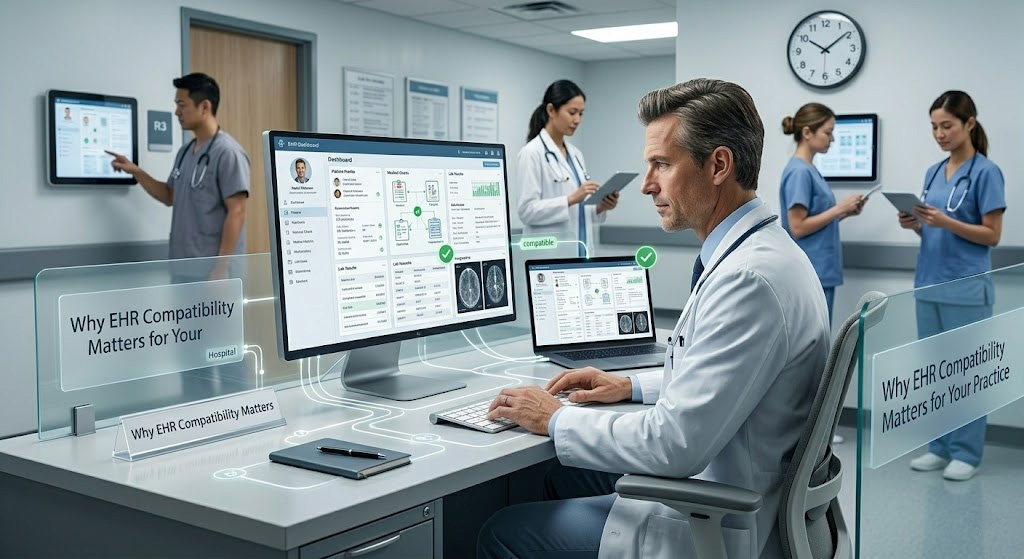
EHR compatibility refers to how well your electronic health record can exchange, interpret, and use data with other software and external systems. It is not a single feature but a spectrum of capabilities that determine how seamlessly information moves between your practice and the broader healthcare ecosystem.
At the most basic level, compatibility determines whether your EHR can send claims to insurance payers without manual re-entry. At its most sophisticated, it means your clients’ records are accessible to authorized providers across town in real time, regardless of what system those providers use.
The Three Types of Compatibility You Need to Understand
Technical Compatibility
This is about standards—specific protocols and formats that healthcare systems use to exchange data. The current relevant standards are:
HL7 version 2.x is the legacy messaging standard that most older healthcare systems still use. It is widely supported but was designed in a different era of computing. FHIR (Fast Healthcare Interoperability Resources) is the newer standard, designed for modern web-based exchange. Systems that support FHIR APIs integrate more easily with contemporary tools, mobile apps, and emerging technologies. If an EHR vendor claims to be “FHIR-compliant,” they have met specific technical requirements for data exchange.
Integration Compatibility
This is practical: the actual tools your EHR connects to in daily practice. E-prescribing through your EHR eliminates a separate portal. Billing integration through your clearinghouse means claims go through without manual re-entry. Client portals built into your EHR reduce intake paperwork and phone tag. Telehealth integration means appointments happen in one place rather than switching between platforms.
The more your EHR integrates natively, the less administrative overhead you carry.
Data Portability
Data portability determines whether you can take your information if you ever switch systems. Client records belong to clients, and they have rights to access their health information. Before choosing an EHR, ask whether you can export complete records, in what formats, and what fees might apply. The ability to transfer records directly to another EHR matters if you ever need to switch vendors or if a client transfers care.
The Real Costs of Incompatibility
When your EHR cannot talk to other systems, the costs add up quickly. Claim denials due to formatting errors require staff time to correct and resubmit. Delays in processing mean cash flow gaps. Referral information that has to be printed and faxed creates risk of information loss and delays. Intake paperwork that cannot be completed online means more phone tag and administrative burden.
For solo practitioners, these inefficiencies are particularly painful. You do not have administrative staff to absorb the extra work. Incompatibilities that a larger practice might absorb through sheer volume become proportional burdens on your already-full schedule.
What to Ask Before You Buy
Before committing to any EHR system, get clear answers to these questions:
What interoperability standards do you support? The answer should include at minimum HL7 version 2.x, with FHIR support being increasingly expected.
Which clearinghouses and payers do you integrate with directly? Verify your major payers before signing.
Do you offer e-prescribing, and does it connect to the pharmacies my clients use most? This has become table stakes in many states.
Is there a client portal, and what can clients actually do through it? The gap between “we have a portal” and “clients can schedule appointments, complete forms, and message their provider” is significant.
Can I export my data if I leave? What formats are available, and are there export fees?
Do you have an API? This determines whether specialized tools can connect to your EHR in the future.
The Bottom Line
EHR compatibility is not an IT checkbox. It directly affects how efficiently your practice runs, how easily you can coordinate care with other providers, and how much administrative time you spend on tasks that should be automated. The practices that choose systems with strong compatibility foundations spend less time fighting with technology and more time with clients.
Were you satisfied with the information in this article? If yes, our blog offers even more valuable resources.
Read Also
- Innovative Technologies in Oncology: The Future of Cancer Treatment
 Have you ever wondered how far cancer treatment has come in recent years? Advances in technology are making a real difference in the fight against cancer. Today, more people are living longer and healthier lives after a cancer diagnosis. This is all thanks to new and groundbreaking medical advancements. The future of cancer care looks… Read more: Innovative Technologies in Oncology: The Future of Cancer Treatment
 - Cloud-Based Healthcare Administration Solutions: A Guide for Payers, TPAs, and Provider NetworksHealthcare administration has become too complex for disconnected spreadsheets, aging on-premise applications, and manual handoffs between departments. Organizations need technology that can manage claims, enrollment, billing, provider relationships, and member data as connected parts of the same operation. MCSI – Visova is one example, offering a cloud-native vpaas designed to support HIPAA-compliant healthcare administration. Its… Read more: Cloud-Based Healthcare Administration Solutions: A Guide for Payers, TPAs, and Provider Networks
- How Intelligent Invoice Processing Is Reshaping Healthcare AP WorkflowsWhat happens when healthcare invoice volumes outpace the AP team’s ability to review, validate, and route them, while cost per invoice keeps rising? That gap is pushing finance leaders past basic digitization. Supplier invoices across formats, systems, departments, and approval paths, and holding speed, accuracy, compliance, and visibility together gets harder at scale. Intelligent invoice… Read more: How Intelligent Invoice Processing Is Reshaping Healthcare AP Workflows
- From 1905 to 2026: How German Legacy Manufacturers Power Deutsche Dental Technologien’s SuccessFrom 1905 to 2026: How Busch & Co.’s Legacy Powers Deutsche Dental Technologien’s Success In an era where dental technology advances at breakneck speed, few companies embody the perfect blend of historic craftsmanship and modern business agility quite like Busch & Co. and its strategic partner Deutsche Dental Technologien. What began as a small dental bur factory in… Read more: From 1905 to 2026: How German Legacy Manufacturers Power Deutsche Dental Technologien’s Success
- Why the Future of Healthcare Administration is Cloud-NativeThe operational demands placed on modern healthcare administrators have officially outpaced the capabilities of traditional IT infrastructure. While clinical medicine continues to advance at breakneck speed, the back-office systems required to support it often remain painfully stagnant. Today’s insurers, Third-Party Administrators (TPAs), and provider networks are forced to navigate an avalanche of daily claims, aggressive… Read more: Why the Future of Healthcare Administration is Cloud-Native
- The Digital Overhaul: Why Modern Healthcare Administration Demands Advanced Technology SolutionsLet’s be honest about the current state of healthcare administration: it is staggering under its own complexity. The days of managing patient populations, claims, and provider networks with spreadsheets and disjointed legacy systems are long gone. Today, the sheer volume of data processing required just to keep a healthcare organization afloat is enough to paralyze… Read more: The Digital Overhaul: Why Modern Healthcare Administration Demands Advanced Technology Solutions
- Tech-Enabled Healthcare Innovation in Physical Therapy CarePhysical therapy is changing with the help of new technology. Digital tools are now used to support recovery and improve care. These tools help therapists track progress in a better way. Explore how technology is reshaping physical therapy with innovative digital tools. It highlights smarter recovery and patient outcomes in healthcare. Continue reading to discover… Read more: Tech-Enabled Healthcare Innovation in Physical Therapy Care
- 5 Best Payroll Error Detection Software for Healthcare in 2026Healthcare organizations operate some of the most complex payroll environments in any industry. Hospitals, skilled nursing facilities, rehabilitation centers, physician groups, and home healthcare providers must manage thousands of employees working across different shifts, departments, facilities, and compensation structures. Payroll teams are expected to process this information accurately while complying with labor regulations, organizational policies,… Read more: 5 Best Payroll Error Detection Software for Healthcare in 2026